Cyberattacks are no longer an enterprise-only problem. In 2025, 80% of small businesses experienced at least one cyberattack and 41% of those incidents involved AI. The average data breach in the US now costs $10.22 million (IBM, 2025), and ransomware shows up in nearly half of all breaches.
The good news: most breaches are preventable. The right cybersecurity habits include multi-factor authentication, employee training, secure file sharing, regular backups, and blocking the vast majority of attacks before they start.
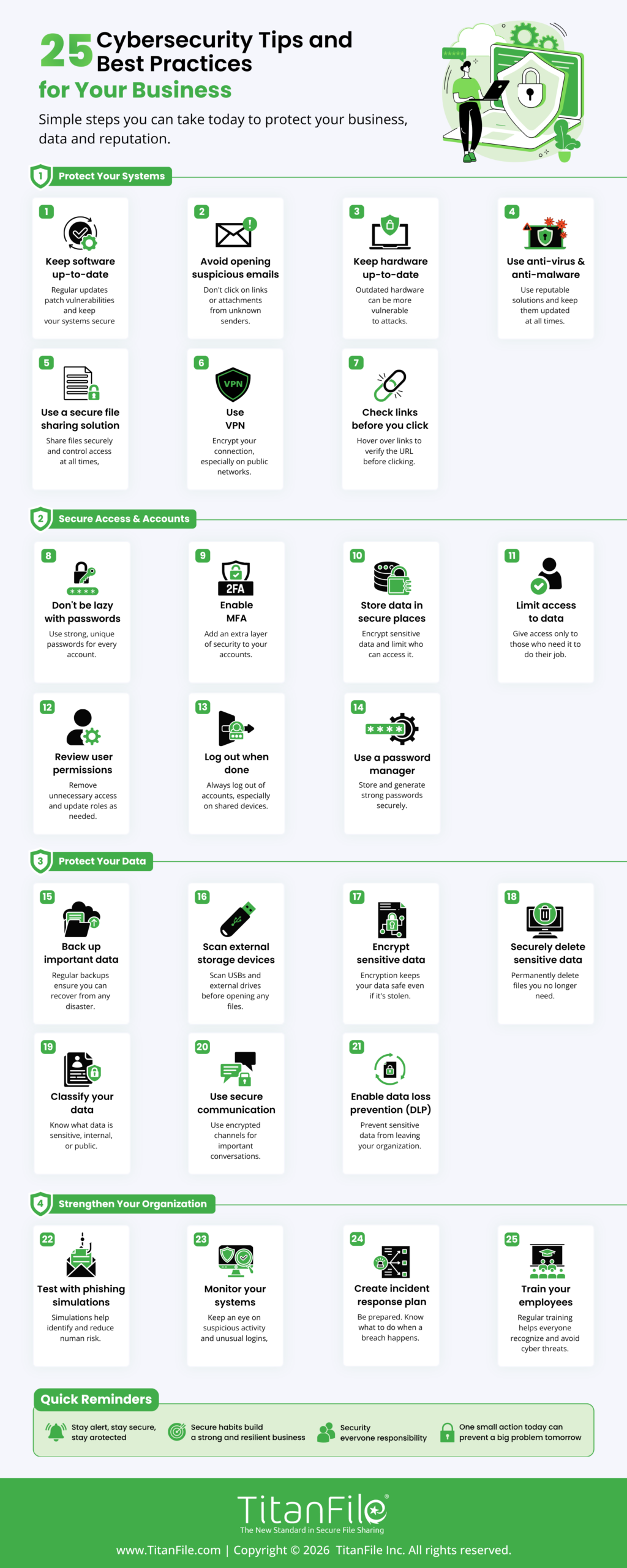
We have curated 25 essential cybersecurity tips and best practices tailored for the 2026 landscape, addressing modern challenges like AI-driven phishing, deepfake scams, and supply-chain risks. Utilize these as your organizational baseline, distribute the infographic among your staff, and save this resource for future reference.
What’s new in 2026?
- AI-generated phishing emails now appear in over 80% of phishing campaigns, and deepfake voice and video are being used in CEO-fraud scams. Old advice like “look for typos” no longer works.
- Multi-factor authentication (MFA) is no longer optional, and passkeys are quickly replacing passwords as the gold standard.
- Zero trust, “never trust, always verify,” has moved from buzzword to baseline expectation, even for small teams.
1. Keep software up-to-date
Software companies typically provide software updates for 3 reasons: to add new features, fix known bugs, and upgrade security.
Always update to the latest version of your software to protect yourself from new or existing security vulnerabilities.
2. Avoid opening suspicious emails
If an email looks suspicious, don’t open it because it might be a phishing scam.
Someone might be impersonating another individual or company to gain access to your personal information. Sometimes the emails may also include attachments or links that can infect your devices.
3. Keep hardware up-to-date
Outdated computer hardware may not support the most recent software security upgrades. Additionally, old hardware makes it slower to respond to cyber-attacks if they happen. Make sure to use computer hardware that’s more up-to-date.
4. Use a secure file sharing solution to encrypt data
If your team regularly handles confidential documents like client files, financial records, and legal matters, regular email isn’t built for it. Intercepted emails expose sensitive data and put you on the wrong side of compliance frameworks like HIPAA, PIPEDA, and the SEC Safeguards Rule.
A purpose-built secure file sharing platform like TitanFile encrypts files end-to-end, lets you control access by recipient, and creates the audit trail compliance auditors ask for. Your files are only as secure as the tools you share them with.

5. Use anti-virus and anti-malware
As long as you’re connected to the web, it’s impossible to have complete and total protection from malware. However, you can significantly reduce your vulnerability by ensuring you have an anti-virus and at least one anti-malware installed on your computers.
6. Use a VPN to privatize your connections
For a more secure and privatized network, use a virtual private network (VPN). It’ll encrypt your connection and protect your private information, even from your internet service provider.
Related Article | 8 Advantages of Using a VPN
7. Check links before you click
Links can easily be disguised as something they’re not so it’s best to double check before you click on a hyperlink. On most browsers, you can see the target URL by hovering over the link. Do this to check links before you click on them.
8. Don’t be lazy with your passwords!
Put more effort into creating your passwords. You can use a tool like howsecureismypassword.net to find out how secure your passwords are.
9. Disable Bluetooth when you don’t need it
Devices can be hacked via Bluetooth and subsequently your private information can be stolen. If there’s no reason to have your Bluetooth on, turn it off!
10. Enable Multi-Factor Authentication (MFA)
Multi-factor authentication (MFA) blocks 99.9% of automated account attacks, yet 65% of small businesses still don’t use it. Enable MFA everywhere it’s available, especially on email, financial accounts, and admin logins.
Where possible, use phishing-resistant MFA like hardware security keys (YubiKey) or passkeys. SMS codes are better than nothing, but they’re vulnerable to SIM-swap attacks.
11. Remove adware from your machines
Adware collects information about you to serve you more targeted ads. It’s best to rid your computer of all forms of adware to maintain your privacy. Use AdwCleaner to clean adware and unwanted programs from your computer.
12. Double-check for HTTPS on websites
When you’re on a website that isn’t using HTTPS, there’s no guarantee that the transfer of information between you and the site’s server is secure. Double-check that a site’s using HTTPS before you give away personal or private information.
13. Don’t store important information in non-secure places
When storing information online, you want to keep it in a location that can’t be accessed by unauthorized users.
14. Scan external storage devices for viruses
External storage devices are just as prone to malware as internal storage devices. If you connect an infected external device to your computer, the malware can spread. Always scan external devices for malware before accessing them.
15. Avoid using public networks
When you connect to a public network, you’re sharing the network with everyone who is also connected. Any information you send or retrieve on the network is vulnerable. Stay away from public networks or use a VPN when you’re connected to one.
16. Avoid the “secure enough” mentality
Unless you’re completely isolated from the rest of the world, there’s no such thing as being “secure enough.” Big companies like Facebook invest a fortune into security every year but are still affected by cyber attacks.
17. Invest in security upgrades
Following the previous tip, try to invest in security upgrades when they’re available. It’s better to eat the costs of security than pay for the consequences of a security breach!
18. Back up important data
Follow the 3-2-1 backup rule: keep 3 copies of important data, on 2 different types of media, with 1 copy stored offline or off-site. The offline copy is what saves you when ransomware hits; attackers can’t encrypt what they can’t reach.
Test your backups regularly. A backup you’ve never restored from isn’t a backup; it’s a hope.
19. Train employees
Annual training doesn’t work anymore. Best practice in 2026 is a mix of monthly micro-training (5-10 minute sessions), quarterly phishing simulations, and role-specific training for high-risk roles like finance and executive assistants.
Your training should cover today’s threats: AI-generated phishing emails, deepfake voice and video calls, and social engineering through Slack and Teams. Organizations with continuous training programs experience up to 70% fewer successful phishing attacks than those with annual-only training.
Related Article | How to Create a Corporate Culture Focused on Security
20. Use HTTPS on your website
Having an SSL certificate installed and HTTPS enabled on your website will help encrypt all information that travels between a visitor’s browser and your web server.
21. Employ a “White Hat” hacker
Not all hackers are bad. Some hackers expose security risks for the sake of helping others improve their cybersecurity by keeping them aware of security flaws and patching them. These hackers are known as “white hat” hackers. It might benefit you to hire one to help you find risks you never knew you had.
22. Implement a Zero Trust approach
The old “build a wall around the office network” model is dead. Zero Trust assumes no user or device is trustworthy by default; every access request is verified, every time. Start with the basics: enforce least-privilege access (employees only get access to what they actually need), require MFA on every login, and log every access event so unusual activity gets flagged early.
23. Watch out for AI-generated phishing and deepfakes
AI makes fake (phishing) messages much more convincing. Attackers can now create perfect emails in any language. They can copy voices from short audio clips. They also make fake video calls that look just like it’s coming from your CEO. Tell your team to double-check any strange requests, especially for sending money or changing login details. They should use a second way to check, like a trusted phone number or talking in person. If something feels wrong, it likely is.
24. Evaluate your vendors and third-party tools
Your security is only as strong as the weakest vendor with access to your data. Supply-chain breaches have quadrupled in recent years. Before you hand over data or system access, ask vendors about their security certifications (SOC 2, ISO 27001), encryption standards, breach history, and incident response process. Build security expectations into vendor contracts and review them annually.
25. Have an incident response plan ready
Most breaches take an average of 241 days to detect and contain (IBM, 2025), and the longer it takes, the more it costs. A documented incident response plan cuts that timeline dramatically. At minimum, document: who gets called first, how you isolate affected systems, your legal/regulatory notification obligations, and how you communicate with customers. Run a tabletop exercise once a year so the plan isn’t a PDF nobody’s read.
Cybersecurity Tips & Best Practices: FAQs
1. What are the most important cybersecurity best practices for businesses?
The five highest-impact practices are: enabling multi-factor authentication on every account, training employees continuously to spot phishing, keeping software and hardware patched, backing up data using the 3-2-1 rule, and using encrypted file-sharing tools for confidential documents. These cover the majority of attack vectors small and mid-sized businesses face.
2. What are the biggest cybersecurity threats in 2026?
The top threats are AI-generated phishing and deepfakes, ransomware (which now appears in 44% of breaches), supply-chain attacks through third-party vendors, stolen credentials, and cloud misconfigurations. Attackers increasingly use AI to scale and personalize attacks.
3. How much should a small business spend on cybersecurity?
Industry benchmarks recommend allocating 10–15% of your total IT budget to cybersecurity. Regulated sectors like legal, healthcare, and finance typically need to spend more.
4. Is cybersecurity insurance worth it?
For most businesses, yes. The average cyberattack costs a small business between $120,000 and $254,000. Cyber insurance covers breach response, legal fees, and business interruption losses that can sink an unprotected company.
5. What is the 3-2-1 backup rule?
Keep 3 copies of your data, on 2 different types of storage media, with at least 1 copy stored offline or off-site. The offline copy is your insurance against ransomware.
6. How often should I update software for security?
Turn on automatic updates wherever possible. For systems where you can’t, apply high-severity patches within 30 days, and patch actively exploited zero-day vulnerabilities within 7 days. Unpatched software is consistently a top-three attack vector each year.
7. How do I protect my business from AI-generated phishing?
Old advice like “watch for typos” no longer applies. Train employees to verify any unusual request through a second, known channel, for example, calling the requester back at a number from your contact list, not the one in the email. Combine that with strong email filtering, MFA, and out-of-band approval for any wire transfer or credential change.
8. What’s the difference between cybersecurity and information security?
Information security covers all forms of sensitive data, including paper documents, physical access, and verbal disclosures. Cybersecurity is the subset focused on protecting digital systems, networks, and data from electronic attacks. For most small businesses, the two overlap heavily, and the practices in this guide cover both.
You’ve reached the end of this list. Help share the Cybersecurity Tips and Best Practices infographic below to help us keep other businesses secure!